
info@skybots.in
+91 8754531574
Location
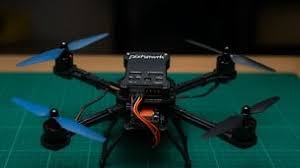
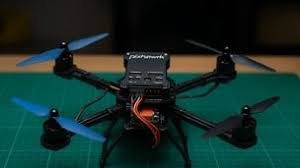
Build Your Drone: Assemble an F450 quadcopter with Pixhawk 2.4.8, FlySky system, and ESCs – no soldering required.
Configure with Ease: Set up Mission Planner to calibrate sensors, tune parameters, and ensure stable flights.
Master Flight Modes: Transition from Stabilize to AltHold and explore autonomous flight basics.
Troubleshoot Like a Pro: Debug common issues (e.g., flips on takeoff) using Mission Planner logs.
Fly Safely Indoors and Outdoors in open spaces and confined spaces.
Understand Key Components: Get hands-on with Pixhawk 2.4.8, FlySky transmitter/receiver, and ESC setup.
| Introduction | 1:28 |
| About the course | 5:04 |
| Why do you need this course | 5:08 |
| Introduction to the drone parts | 7:13 |
| Drone components links | 0:11 |
| Installing mission planner on windows | 3:13 |
| Pixhawk hardware wiring | 2:06 |
| Pixhawk connection with mission planner | 4:47 |
| Understanding the log messages | 3:32 |
| Install the firmware | 3:44 |
| Frame setup for drones.mp4 | 3:52 |
| Accel calibration | 3:42 |
| Compass calibration | 6:10 |
| Introducing FS-IA6B receiver | 2:39 |
| Binding the receiver with the transmitter | 3:35 |
| Set up transmitter's output mode | 1:41 |
| Assinging switches for transmitter | 3:26 |
| Understanding the connection SWC and Channel 5 | 3:40 |
| Radio calibration | 5:06 |
| SWC switch reserse setup | 1:42 |
| Setup flight mode | 3:09 |
| Battery voltage measure and setup | 3:40 |
| Setup false mode | 2:24 |
| Assemble the drone | 22:03 |
| Mount the GPS | 5:22 |
| Throttle and ESC calibration | 3:55 |
| Correct the motor rotation | 11:09 |
| Pre flight param set | 2:45 |
| Setup PosHold on Mission planner | 1:29 |
| Satellite connection for posHold mode | 1:37 |
| First fly with PosHold mode | 2:34 |
| Pre flight checks | 2:06 |
| Practice flying Stabilize mode | 3:30 |
| Low altitude flying in Stabilize mode | 0:53 |
Ready to take flight with your very own drone? Whether you’re a complete beginner or a hobbyist eager to dive into the world of autonomous drones, Pixhawk Drone Step-by-Step for Absolute Beginners is your ultimate guide to building, configuring, and flying a drone from scratch – no soldering or prior experience needed!In this hands-on course, you’ll learn how to assemble and program a professional-grade drone using the Pixhawk 2.4.8 flight controller, the industry-standard for DIY drones.
We’ll guide you through every step using the F450 frame, FlySky transmitter and receiver, and Electronic Speed Controllers (ESCs), with clear, beginner-friendly instructions. Using Mission Planner, you’ll master drone setup, calibration, and flight, all while avoiding complex wiring or soldering.
Absolute beginners curious about building and flying drones.
Hobbyists looking to master Pixhawk-based drones without technical barriers.
STEM students or educators exploring drone technology for projects.
Anyone wanting to fly a drone with GPS safely.

I am a teacher who has been teaching for the last 18 years and I am very good at explaining things. I also have a youtube channel where I have a lot of followers little more 65k.
I lecture on Flutter, React Native, Laravel and GoLang.






Incorrect OTP
Incorrect OTP
Designed and Developed by B2L Mobitech Pvt. Ltd.
Incorrect OTP
Designed and Developed by B2L Mobitech Pvt. Ltd.